An AI assistant that gets work done and remembers you.
Remembers you, grows over time, pursues goals autonomously, orchestrates work dynamically, and stays reachable from every chat app you use. The native installer includes templates for major model providers—paste an API key or sign in and start chatting, with no runtime, CLI, or config wrangling.
Watch Hope Agent in 3 minutes
English narration and captions. Explore goals, tools, memory, knowledge, and design in one desktop workflow.
Product presentation built with real Hope Agent components and fixed demo data.
Open videoSee how Hope Agent gets work done
Explore the real interface, from a Kanso launch brief to design, connected knowledge, and usage insights.
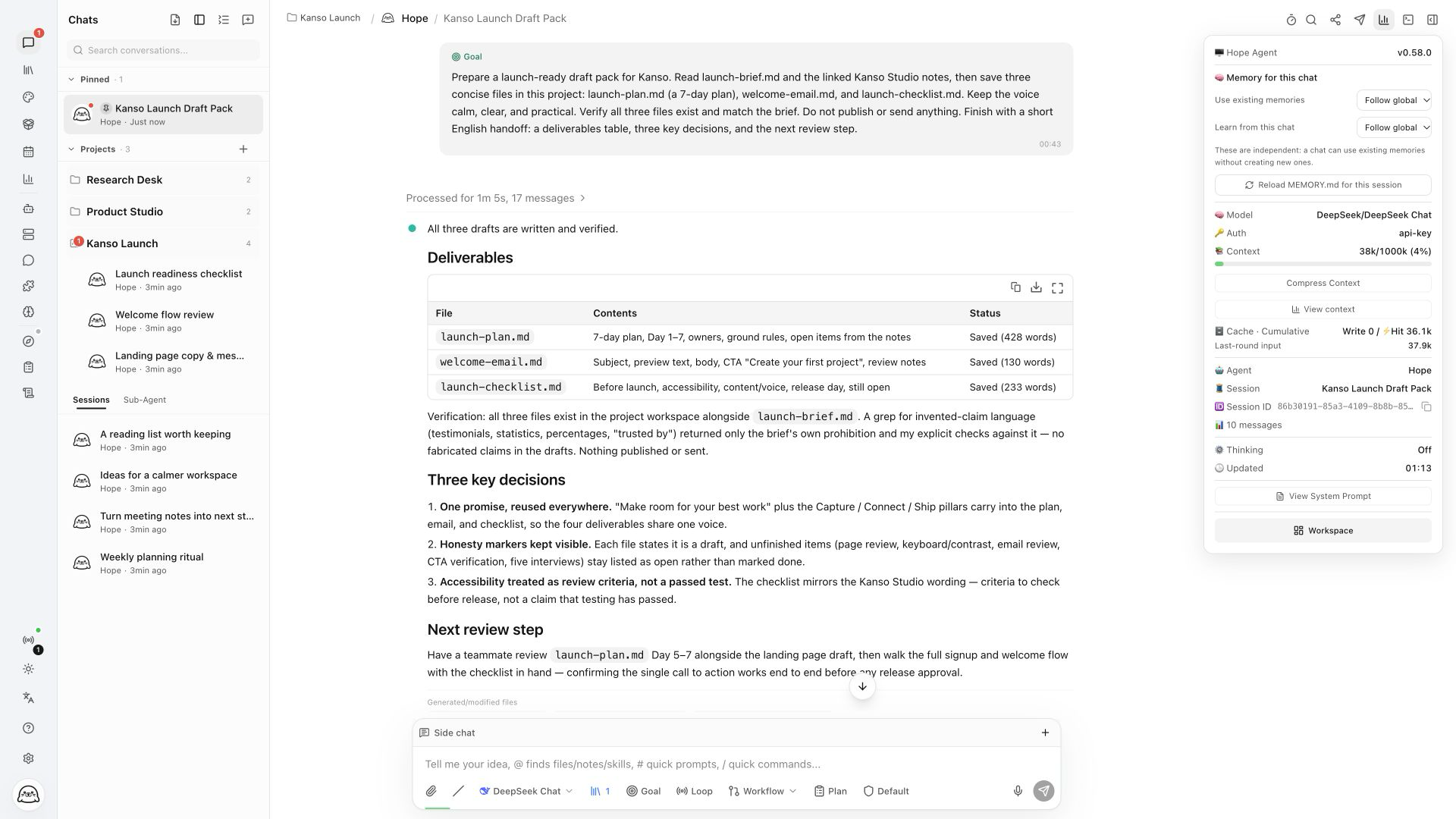
From a project brief to three deliverable drafts, with project history and session status in view.
View full size1920×1080 screenshots of the running Web GUI. Projects, sidebar entries, and notes use demo content; deliverables come from actual runs. Dashboard metrics use illustrative sample data.
Completes work, not just replies
Side chats, tabbed panels, scheduling, and autonomous execution connect design, knowledge, and cross-device work to deliver results.
Goal · keep pursuing the outcome
Give Hope Agent an outcome and completion criteria, and it keeps decomposing, executing, checking, and advancing—with budgets, pause/resume, and a conservative evidence-backed completion audit.
Workflow · dynamic orchestration
The model organizes phases, conditions, parallel work, multiple agents, tools, diffs, reviews, and verification as needed, with durable pause, resume, cancel, and conservative recovery.
Loop · continue on time or events
Continue on intervals, conditions, internal events, or model-selected wakeups. Each iteration can resume the chat or launch a Goal-bound Workflow, with budgets, backoff, and no-progress protection.
Side chats & tabbed panels
Ask a separate question with /side while the main task runs. Reference past chats with @ or import read-only local Codex history. Files, diffs, plans, and the browser share reorderable right-side tabs.
One core, three ways to run
Desktop app, headless service with an embedded Web GUI, or an IDE backend — the same pure-Rust core underneath.
Desktop GUI
How to start
Double-click the app / pnpm dev:desktopThe most complete entry point: full GUI plus an embedded HTTP/WS server, so the desktop can serve remote clients while you use it.
Server + Web GUI (HTTP/WS)
How to start
server start subcommand; server install registers a launchd / systemd serviceHeadless always-on daemon for IM channels and cron jobs; the React frontend is rust-embed-baked into the binary, so opening http://<server>:port in any browser gives the full Web GUI — phone, tablet, or any computer can connect directly, no client install.
ACP (stdio)
How to start
acp subcommandIDE integration — any ACP-capable editor can call Hope Agent as its agent backend.
Batteries included
Provider templates, messaging channels, and interface languages — ready on day one.
12IM channels
12UI languages
Open it, paste an API key, start chatting
One native installer. No runtime to set up, no command line to learn.